Local directory
A folder mounted into the container, scanned in place. Nothing is copied, and it is mounted read-only.
handbook/install.mdContextator merges a mounted folder, a git repository, an upload, a Notion workspace, a Confluence site, a published documentation site, an S3 bucket, a Google Drive folder and a GitHub issue tracker into one semantically searchable MCP endpoint per project — running in a single Docker container on your own machine.
No vendor account · No API key · No egress with local sources and a cached model
If the best hit is below SEARCH_SCORE_FLOOR (0.82), it answers “no good match” instead of guessing.
A product's knowledge is genuinely spread across a repository, a wiki, a vault and an export. Every existing answer asks a human to consolidate first — which never happens.
Bounded by the context window, stale the moment it is pasted, and repeated by every developer on the team.
Fine for docs in the same checkout. Useless for the handbook in Notion, the API reference in another repository, the vault on an architect's laptop.
Solves retrieval by shipping internal documentation to a third party, one account per team, billed per query. For many organisations that ends the conversation.
Every team writes the same chunker, the same embedding loop, the same incremental indexer — and then maintains it.
Contextator next to Context7, a hosted RAG service (Pinecone Assistant) and a local documentation MCP server (Grounded Docs). Rows marked “Contextator is weaker here” are where at least one of them does better. Every cell about another product restates its own public documentation; where that says nothing, so does the cell.
| Compared on | Contextator | Context7 | Pinecone Assistant | Grounded Docs MCP Server |
|---|---|---|---|---|
| Where it runs | On your server — one Docker container you run. | Context7’s cloud. Self-hosting the whole stack is an Enterprise option with a licence key. | Pinecone’s managed service. | On your machine, through npx or Docker. |
| Setup before the first answerContextator is weaker here | Run the container, create the first account with the one-time setup code from its log, create a project, add a source, wait for its first index, then point your client at the project’s MCP URL. | Add its remote MCP URL to your client. A free API key raises the rate limits. | Create an assistant, upload files, then connect its MCP endpoint with a Pinecone API key. | Start it, then add each documentation source via its CLI, an MCP tool or its web interface. |
| Ready-made public library docsContextator is weaker here | None — it indexes only the sources you add. | Yes — a shared catalogue of public libraries, refreshed automatically. | None — it answers from the files you upload. | No catalogue — it fetches the websites, repositories and npm or PyPI packages you name. |
| Your internal sources | Local folder, git (private repositories with a token), upload, Notion, Confluence, a public documentation site, an S3 bucket, Google Drive and GitHub issues. | Private GitHub, GitLab, Bitbucket and other git repositories, Confluence and OpenAPI specs — on Pro or Enterprise. | Files you upload. | Local folders, zip archives, websites and GitHub repositories. |
| File formatsContextator is weaker here | Markdown, MDX, HTML, PDF, Word, CSV and plain text, inside archives too; OpenAPI, Obsidian and Notion exports get their own handling. | Markdown, MDX, reStructuredText, plain text and Jupyter notebooks; examples are generated from source code only when a repository has little documentation. | PDF, Word, Markdown, plain text and JSON. | Wider — PDF, Word, Markdown and MDX, plus Excel, PowerPoint, OpenDocument, EPUB, Jupyter notebooks and source code. |
| Where your documents go | They stay on your server, except text sent to OpenAI if you switch embeddings to it. | Hosted: to Context7’s service. Self-hosted: only the content needed for parsing, embedding, reranking or generating docs from source code, to the AI provider you choose. | Uploaded to Pinecone, which chunks, embeds and stores them. | They stay on your machine, except text sent to an embedding provider you configure — OpenAI by default when its key is set. |
| Operated for youContextator is weaker here | No — upgrades, backups and uptime are yours. | Yes, on the hosted service. | Yes. | No — it runs on your machine. |
| Licence | AGPL-3.0-or-later, or a commercial licence. | MCP server under MIT; its API backend, parser and crawler are private. | A managed service on Pinecone’s terms; its local MCP server is open source. | MIT. |
Sources: Context7, Pinecone Assistant, Grounded Docs MCP Server. Their docs were read on 25 September 2026.
An index run syncs every source, walks the result, chunks each file along its headings and embeds the chunks next to their document. Your question travels the same path in reverse — as meaning and as exact wording at once.
Incremental. Files are hashed. Re-indexing an unchanged collection performs zero embeddings.
Isolated. Every query is scoped by project; a session issued for one is rejected on another.
Observable. The last 20 runs of each project are kept, with their mode, counts, duration and error.
A project may hold any number of sources at once. Each one syncs on its own and fails on its own — a broken source never empties the index.
A folder mounted into the container, scanned in place. Nothing is copied, and it is mounted read-only.
handbook/install.mdA shallow single-branch checkout over HTTP(S). Private repos with a token, one subdirectory if you like, re-indexed by push webhook. A git server on an internal network has to be allow-listed with GIT_ALLOWED_HOSTS; every request goes through an egress guard.
api-repo/reference/auth.mdDrop files, whole folders or a .zip, .tar or .rar on the dashboard. Extracted with traversal and decompression-bomb guards.
spec-2024/overview.mdA content-type transform on an upload, folder or repo, not a source of its own: wikilinks in all their forms, callouts and %%comments%% flattened to ordinary Markdown before a single chunk is cut.
vault/architecture.mdEvery page shared with your integration, or picked through Connect with Notion, rendered to Markdown and kept in sync by last_edited_time. An integration token can also sync at once through a webhook.
notion/onboarding.mdEvery page in the spaces you name, rendered to Markdown and nested the way it is in the wiki. Confluence Cloud or Data Center 7.9 and later — not Confluence Server. Kept in sync on a schedule, or at once through a webhook.
wiki/eng/runbooks.mdA published site, found through its sitemap, its llms.txt or a crawl from one start URL. Public pages only, converted by the same transform uploaded HTML goes through, and re-fetched with conditional GETs. A site on an internal network has to be allow-listed with WEB_ALLOWED_HOSTS; every request and redirect goes through an egress guard.
vendor-docs/guide/install.mdThe objects under one prefix of an S3-compatible bucket — AWS S3, MinIO, Ceph, R2 — signed with SigV4 and read without an SDK. A scheduled check only lists the prefix; a run downloads just the objects whose ETag changed and drops the ones that are gone. A private endpoint has to be allow-listed with SOURCE_ALLOWED_HOSTS.
handbook/guides/install.mdThe files under folders you share with a Google service account. Docs become Markdown, Sheets and Slides are converted like any upload. No Google client library: requests go only to oauth2.googleapis.com and www.googleapis.com, and a scheduled check is one changes.list call.
team-drive/Handbook/Guide.mdThe issues of one repository, and optionally its Discussions, one document each with its comments. Closed issues are opt-in and pull requests are never indexed. A token is optional for a public repository, and GitHub Enterprise Server works through its API address. The repository’s files and wiki stay with the git source.
tracker/issues/12.mdA source's name is the first segment of every document it contributes. That is what tells the agent which repository an answer came from — and what lets two sources hold the same file name.
The agent gets a tiny, self-describing surface — so you ask a question instead of naming a tool. Complexity lives in the dashboard, where a human is looking.
search_docs(query, limit, source, path_prefix, version)Hybrid search across the project's chunks — meaning and exact wording fused by rank, so an environment variable finds its page as readily as a question does. Ranked excerpts, each with its file path, heading breadcrumb and score; source, path_prefix and version narrow it to one source, one directory or one release.
list_topics(cursor, limit)Everything the project holds, grouped by directory, with titles, chunk counts and the source each document came from. What an agent calls when it wants to know what exists before it searches — and it pages, so a project of a thousand documents can be listed to the end.
read_document(path, heading, from, to, max_tokens)One indexed file, served from the database rather than the disk — so it still reads after the file moved. Pass a heading breadcrumb straight out of a search result to read only that section, or from/to for a chunk range. Only paths indexed for that project are served, never an arbitrary filesystem path, and the answer is capped at max_tokens and says where it cut.
whats_new(since, source, version, limit)What was added, changed or removed in the project after a point in time, newest first. Every answer says how far back the record reaches and whether it covers the whole window, so an empty list is never mistaken for “nothing changed”.
report_gap(query, note)For an agent that searched, read what turned up and found the answer is not there: it tells the maintainers which question the documentation does not answer. The report goes to a table of its own, never to the documentation, and the tool answers “received” whether the report was stored, was over its limit or was dropped. It is absent while the project’s query log is off.
An agent cannot change the documentation, cannot reach another project, cannot read a file that was not indexed, and cannot trigger an index run; the one thing it can write is a gap report, in a table of its own that it cannot read back. Indexing stays an operator action — dashboard, API, webhook or a per-source schedule. Besides the tools, the endpoint offers two prompts, answer_from_docs and explore_topic, and the project’s indexed documents as contextator:// resources.
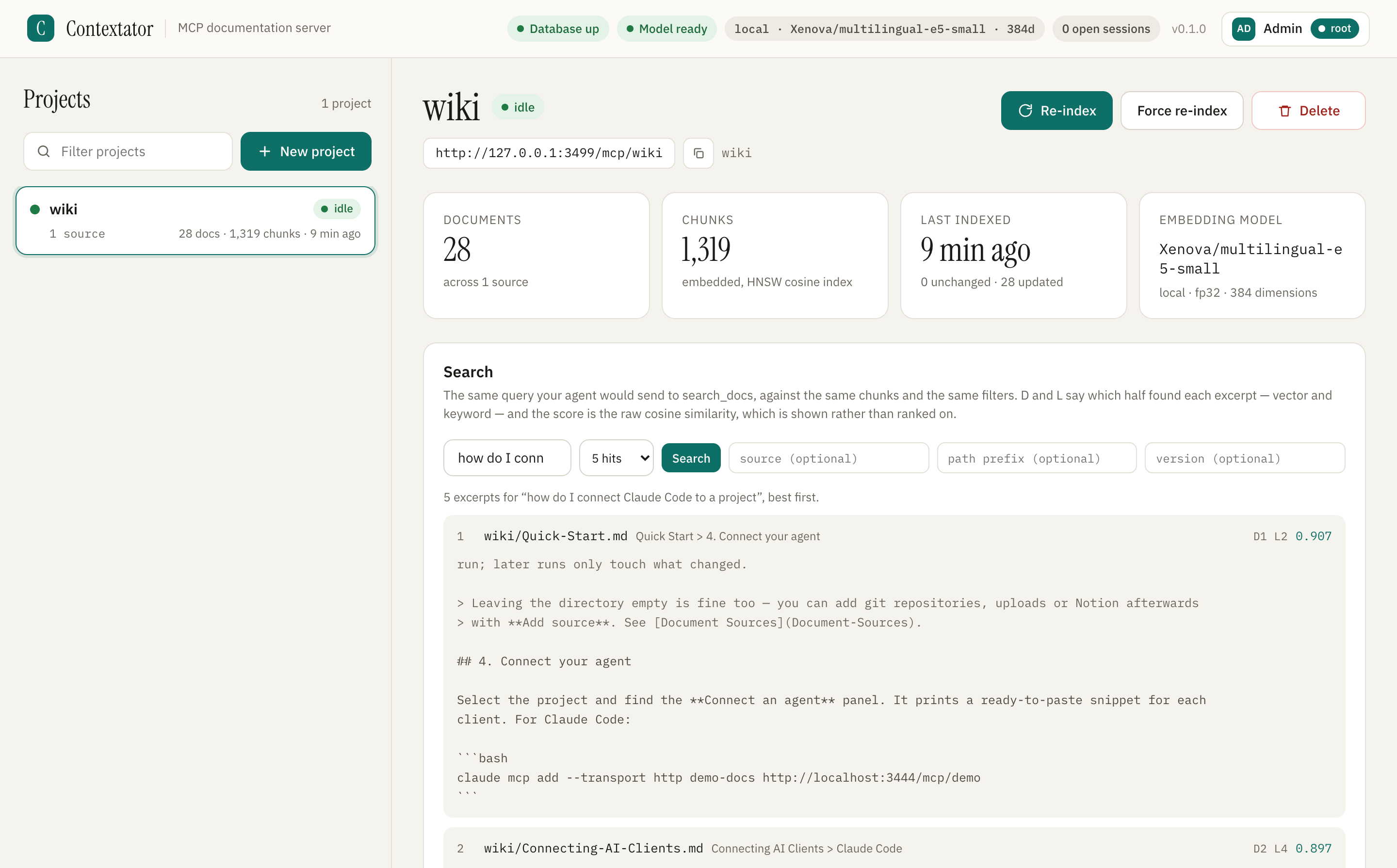
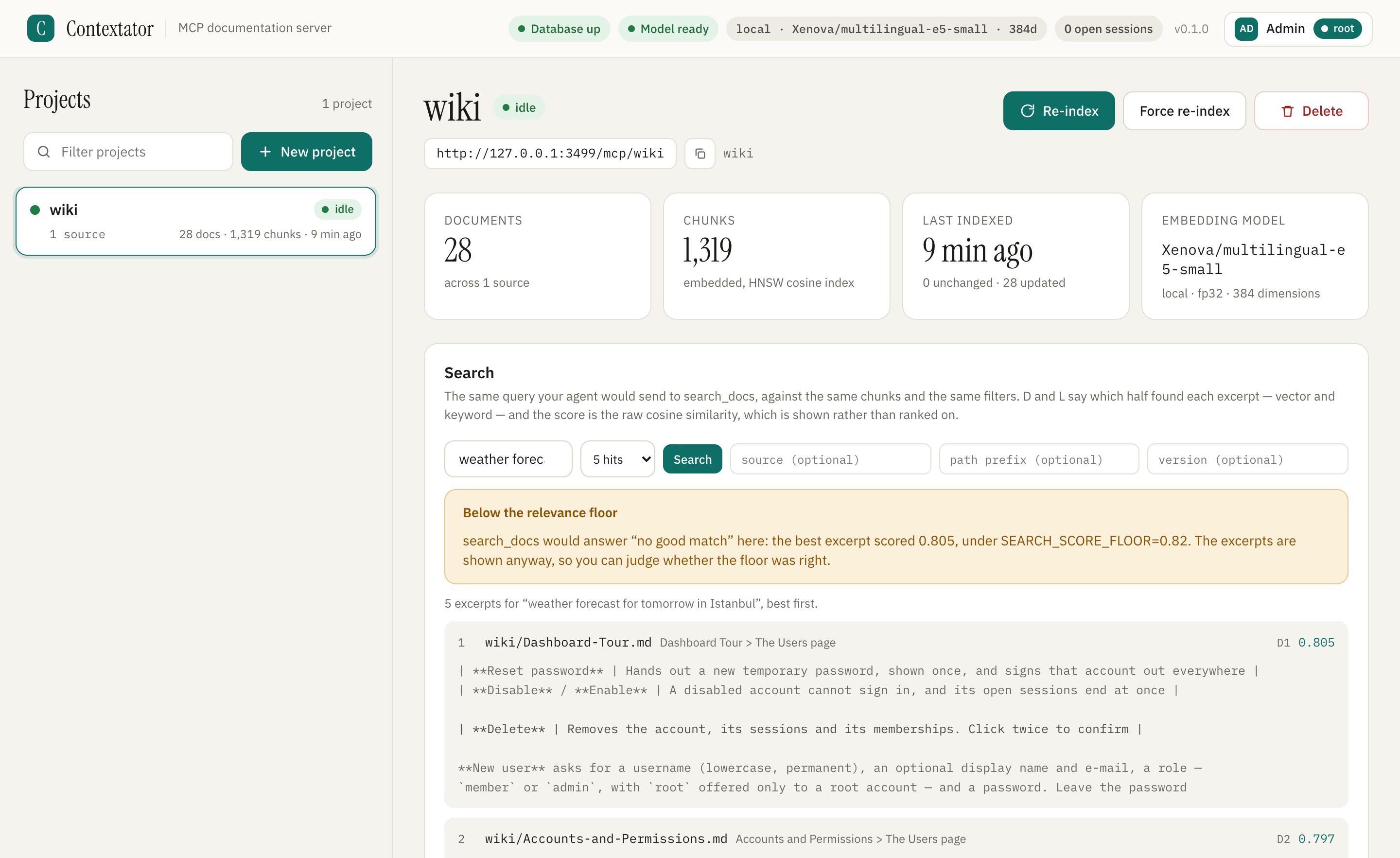
The dashboard sends the query an agent would send to search_docs and shows what comes back: the file, the heading, which half of retrieval found each excerpt, and the raw score. When nothing clears the floor, it says so.
 Open the full-size screenshot
 Open the full-size screenshot
Captured from a local install of Contextator’s main branch, indexing the project’s own wiki: 28 documents, 1,319 chunks, embedded locally with multilingual-e5-small. Cropped, not edited — every path, rank and score is what that install returned.
Embeddings are computed on your CPU with a 384-dimension multilingual model. Once the model is cached, a default installation makes no outbound call at all.
Meaning and exact wording are searched at once and fused by rank, so HALYARD_DISPATCH_TIMEOUT finds its page as readily as a question does. Below the relevance floor — a cosine similarity, 0.82 by default — it answers “no good match” rather than handing over a hit an agent would cite.
Separate documents, separate embeddings, separate sessions. A client connected to /mcp/billing can never observe /mcp/mobile.
Every file carries the sha256 of its raw bytes. A re-index touches only what changed, so a push webhook on every merge stays cheap.
100 languages including Turkish, on a 384-dimension model that runs on your CPU. Ask in the language the answer is written in: matching across languages is a measured limit of the model, not a switch.
An OpenAPI or Swagger file is indexed as one document per operation — path, method, parameters, schemas, examples — so a search returns GET /pets/{petId} rather than the file that contains three hundred of them. Two releases in one project stay apart: version: "v3" picks one.
PostgreSQL 16 with pgvector ships inside the image, listening only on loopback. No database to install, and no migration command to run — ever. Prefer your own PostgreSQL with pgvector? The -slim image leaves the database out.
One address answers both protocol generations: clients that speak the 2026-07-28 MCP protocol are served statelessly, with no session, and earlier clients get session-based Streamable HTTP. The legacy HTTP+SSE transport still answers there too, but it is deprecated and meant for older clients only. You configure nothing.
Docker with Compose and a folder of Markdown. That is all — the database ships inside the container, and the only slow step happens once.
Cursor and Claude Desktop snippets are printed by the dashboard, already filled in.
Contextator is built for one deployment shape: your own network, your own operator. The documentation says so in plain words, and so does this page.
What is protected: accounts with root, admin and member roles; source tokens encrypted with AES-256-GCM and never readable again; per-source webhook secrets verified against the raw body before anything is queued; path containment on every read.
Creating a project mints its first MCP token and shows the secret once — the endpoint requires it by default. It can be opened per project instead, or switched to require an account, where the project's own memberships reach the endpoint through OAuth 2.1 and are checked on every request.
Markdown, MDX and plain text are indexed as they are; HTML, Word, CSV and PDF are converted to Markdown at the edge. There is no OCR, so a scanned PDF, an encrypted one, or a Word file that is all images is refused by name rather than half-indexed.
Retrieval covers 100 languages but does not cross between them. Of thirty questions written to cross the boundary, four are answered in the top five — a property of the embedding model, measured in the repository and not presented here as anything else.
Projects are isolated end to end, deliberately. Two bodies of knowledge that belong to the same question become two sources of one project instead.
Contextator returns your documents faithfully; it does not sanitise intent. Treat the corpus you index as trusted input, because that is what it becomes.
Contextator cannot be closed. Every running instance serves the complete licence text at /license.txt.
Run it, study it, change it, share it. Using it inside your company asks nothing of you. Let other people reach your modified version over a network, and you owe those users its source.
Read the source on GitHubFor organisations whose policy forbids AGPL software, or who need to ship Contextator inside something closed. Granted by the copyright holder.
Ask at tunedness.comThe six questions worth answering before the first docker compose up.
A self-hosted MCP server that turns your documentation — a folder, a git repository, an upload, a Notion workspace, a Confluence site, a published documentation site, an S3 bucket, a Google Drive folder or a GitHub issue tracker — into one searchable endpoint per project, running in your own Docker container.
No. Embeddings are computed on your CPU by default, and the database runs inside the same container. With no remote sources configured, the only outbound traffic is the one-time model download.
No vendor account and no API key — but a project's MCP endpoint is closed as it ships. Creating a project mints its first bearer token and shows it once, and the client sends it with every request; the port itself is published on 127.0.0.1 only. Each project's endpoint has three settings: token, the default; an account of this instance signing in over OAuth 2.1; or open, which you choose deliberately. The dashboard is different again: it creates one local account on first run, behind a one-time setup code printed in the container logs, so it stays your own instance with no vendor involved.
Any client that speaks MCP. Claude Code, Cursor and Claude Desktop are the ones this site walks through, all connecting to the same URL over Streamable HTTP. Older clients can still use the deprecated legacy HTTP+SSE transport.
Nine kinds of source — a local folder, a git repository, an upload, a Notion workspace, a Confluence site, a public documentation site found through its sitemap, its llms.txt or a crawl, an S3-compatible bucket, Google Drive folders shared with a service account and the issues of a GitHub repository — merged into one project. Markdown, MDX and plain text are indexed as they are, and HTML, Word, CSV and PDF files are converted to Markdown as they are indexed; an OpenAPI or Swagger specification becomes one document per operation. There is no OCR, so a scanned PDF or an image is out of scope and is reported rather than indexed.
Yes to both. Contextator ships under AGPL-3.0-or-later, so running the unmodified software — even inside a company — costs nothing and asks nothing of you; the licence only asks for source in return once you let others reach a modified version over a network. A separate commercial licence is available for anyone whose policy forbids AGPL or who needs to embed it in something closed.
One docker compose up -d, one project, one URL — and every agent on the team stops guessing.
AGPL-3.0-or-later · Docker · PostgreSQL 16 + pgvector · Node.js 22